Home Page Overview
This guide walks through the app’s Home page — the first screen you see when you open Qivra B2B Wholesale. It combines a step-by-step setup guide, an operations summary of your B2B channel, and quick access to support.
Setup guide
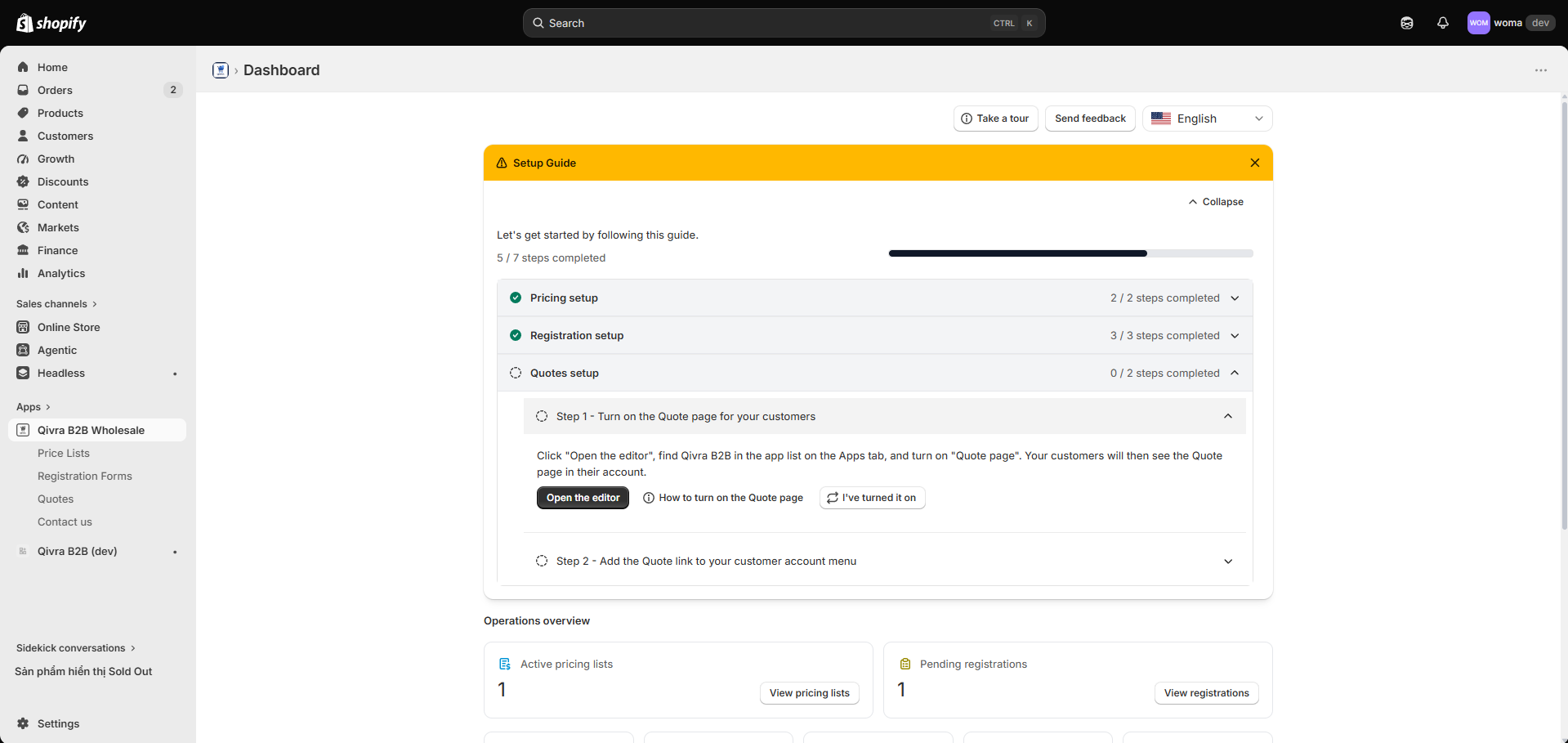
Section titled “Setup guide”The setup guide groups everything you need to go live into three collapsible groups, each with a progress counter (X/Y steps completed):
| Group | Steps |
|---|---|
| Pricing setup | Create your first price list, enable the storefront app embed |
| Registration setup | Activate the registration embed, add the form to a page, create your first form |
| Quotes setup | Turn on the Quote page in customer accounts, add the Quote menu link |
Each step links straight to the screen (or Shopify editor) where you complete it. After finishing a step, use its confirm/recheck button to refresh the status. When all groups are complete, you can dismiss the guide.
- Pricing steps: Quick Start · Enable the app embed
- Registration steps: Create a registration form
- Quotes steps: Quotes overview
Operations summary
Section titled “Operations summary”Below the setup guide, counter tiles give you an at-a-glance view of your B2B operation:
| Counter | What it tracks |
|---|---|
| Active pricing lists | Price lists currently active on your store |
| Pending registrations | Signups waiting for your review |
| RFQ received | New buyer quote requests |
| Quoted | Quotes you have sent |
| Negotiating | Quotes in active negotiation |
| Accepted | Quotes the buyer accepted (ready to convert) |
| Awaiting payment | Converted quotes waiting for buyer payment |
Click any tile to jump straight to the matching list. Counters with a Create action help you get started when the count is zero.
Support section
Section titled “Support section”At the bottom of the Home page:
- Chat with us — live support widget.
- Documentation — link to this help center.
- Feature request and Report a bug — send feedback straight to the product team.
You can also reach the Feedback page from the app navigation at any time.
First-run tour
Section titled “First-run tour”The first time you open the app, a short onboarding tour highlights the two essentials: creating your first pricing list and enabling the app embed. It takes about a minute and can be replayed from the Home page.