Enable App Embed
Before pre-order badges, buttons, and delivery messages can appear on your Shopify store, you need to enable the Qivra PreOrder app embed in your theme. This is a one-time setup that activates the pre-order functionality on your storefront.
What is App Embed?
Section titled “What is App Embed?”An app embed is a Shopify feature that allows apps to add functionality to your theme without modifying theme code. Enabling the Qivra PreOrder app embed:
| Feature | Description |
|---|---|
| Loads pre-order scripts | Enables pre-order rendering on your storefront |
| Registers app blocks | Makes pre-order blocks available in Theme Editor |
| No code changes | Works without editing theme files |
| Theme compatible | Works with all Online Store 2.0 themes |
How to Enable App Embed
Section titled “How to Enable App Embed”Step 1: Open Theme Editor
Section titled “Step 1: Open Theme Editor”- Go to Shopify Admin
- Navigate to Online Store > Themes
- Click Customize on your active theme
Step 2: Find App Embeds
Section titled “Step 2: Find App Embeds”-
In the Theme Editor sidebar, click the gear icon (Theme settings)
-
Select App embeds
Or:
- Click the … (three dots) menu at the top
- Select App embeds from the dropdown
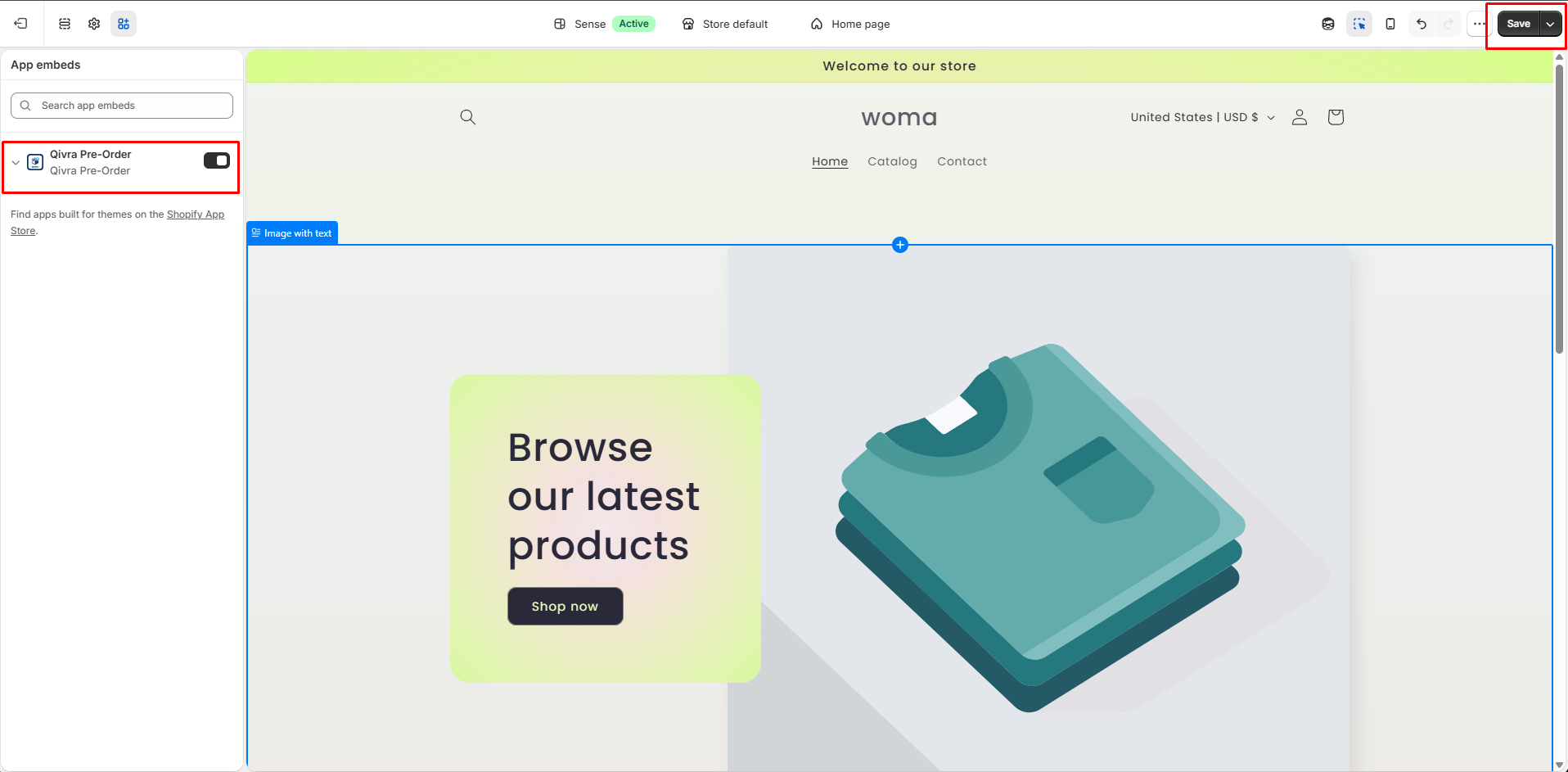
Step 3: Enable Qivra PreOrder
Section titled “Step 3: Enable Qivra PreOrder”- Scroll through the list of app embeds
- Find Qivra PreOrder
- Toggle the switch to On
Step 4: Save
Section titled “Step 4: Save”- Click Save in the top right corner
- Wait for the theme to update
- The app embed is now active
Verifying App Embed is Active
Section titled “Verifying App Embed is Active”Check in Theme Editor
Section titled “Check in Theme Editor”After enabling, you should see:
- Go to any page in Theme Editor
- Click Add section or Add block
- Look under the Apps category
- Qivra PreOrder blocks should appear as available options
Check on Storefront
Section titled “Check on Storefront”- Visit your store
- Open browser DevTools (F12)
- Check the Network or Console tabs
- Look for Qivra PreOrder scripts loading
Troubleshooting
Section titled “Troubleshooting”App Embed Not Showing in List
Section titled “App Embed Not Showing in List”| Cause | Solution |
|---|---|
| App not installed | Install Qivra PreOrder from App Store |
| Theme not OS 2.0 | Update to an Online Store 2.0 compatible theme |
| Cache issue | Clear browser cache and reload Theme Editor |
Toggle Won’t Stay On
Section titled “Toggle Won’t Stay On”| Cause | Solution |
|---|---|
| Theme conflict | Try a different theme |
| App permission issue | Reinstall the app |
| Browser issue | Try a different browser |
Pre-Order Elements Not Displaying After Enabling
Section titled “Pre-Order Elements Not Displaying After Enabling”| Cause | Solution |
|---|---|
| No active offer | Create and activate a pre-order offer |
| Product not in offer | Add the product to an active offer |
| Display settings disabled | Check display settings in the offer |
| Cache | Clear storefront cache |
After Enabling
Section titled “After Enabling”Once the app embed is active, you can:
- Customize badge and button appearance in the display settings
- Configure delivery messages for customer expectations
- Set up pre-order offers for specific products or collections
- Apply pre-order to product pages and collection pages