Customer and Market Selection
This guide covers the Customer selection and Market selection sections of a price list — the controls that decide who sees the B2B price and where.
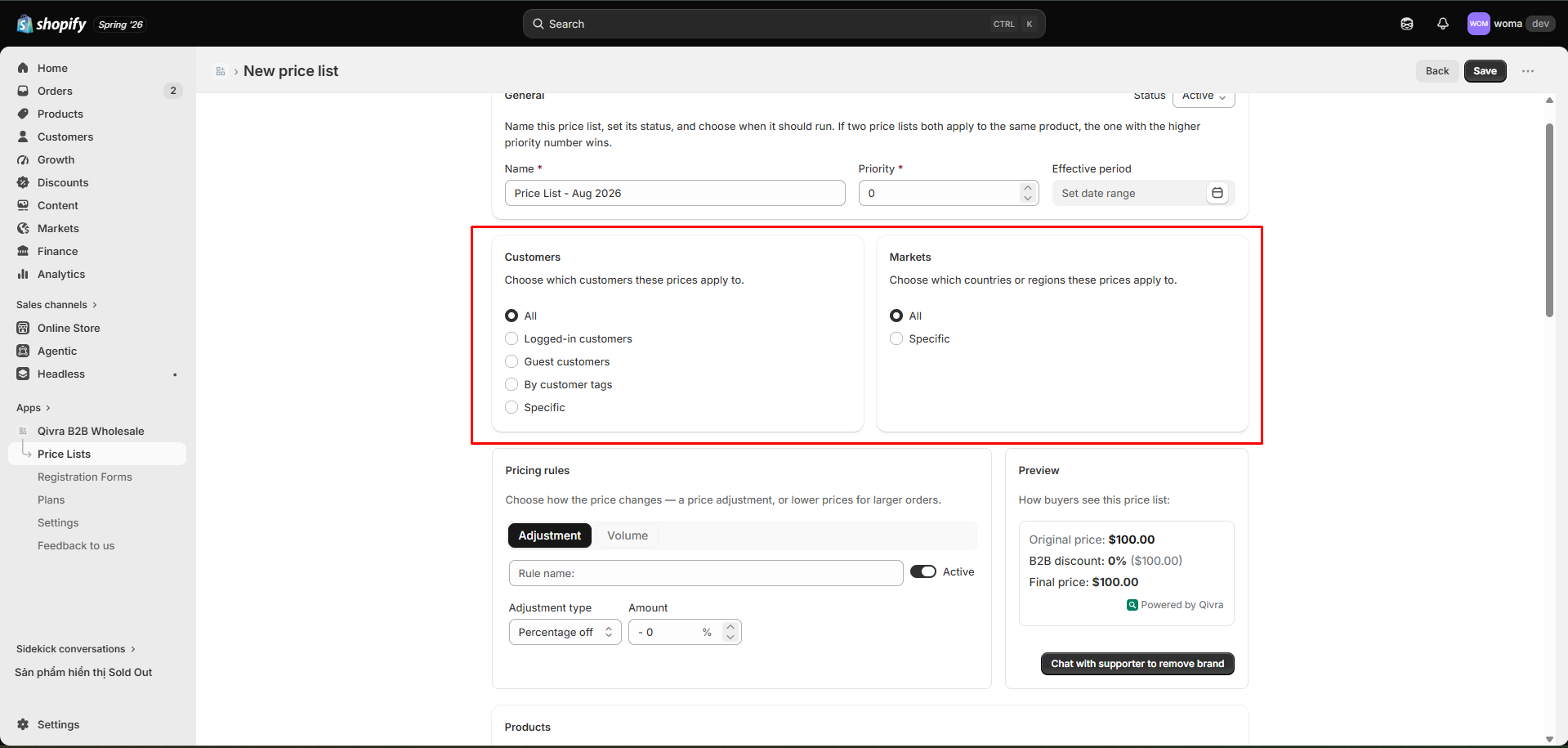
Customer selection
Section titled “Customer selection”Under Customer selection, pick one targeting mode:
| Mode | Who sees the price |
|---|---|
| All | Every shopper, signed in or not |
| Logged-in customers | Only shoppers signed in to a customer account |
| Guest customers | Only shoppers who are not signed in |
| By customer tags | Customers with any of the tags you list (e.g. wholesale, vip) |
| Specific | Individual customers you pick from a picker |
Tag-based selection
Section titled “Tag-based selection”The most common B2B setup is By customer tags:
- Choose By customer tags.
- Enter one or more tags (comma-separated), e.g.
wholesale,b2b-approved. - Any customer carrying at least one of those tags gets the price.
Tag customers from the Shopify admin (Customers → open the customer → add tags), then they qualify automatically.
Specific customers
Section titled “Specific customers”Use Specific for one-off contract accounts. Open the picker, search, and select individual customers. Only the selected customers see the price.
Market selection
Section titled “Market selection”Under Market selection, pick one:
| Mode | Where the price applies |
|---|---|
| All | Every market |
| Specific | One or more markets you pick |
Use Specific to run different wholesale pricing per region (e.g. a separate “Europe Wholesale” price list for your Europe market).
How matching works
Section titled “How matching works”A customer qualifies for a price list only when both selections match:
- The customer meets the Customer selection, and
- Their current market meets the Market selection.
If multiple price lists match the same customer/product/market, the one with the highest priority wins — see Priority and effective period.
Common setups
Section titled “Common setups”| Goal | Customer selection | Market selection |
|---|---|---|
| Wholesale for tagged B2B accounts | By customer tags: wholesale | All |
| Logged-in shopper loyalty price | Logged-in customers | All |
| Region-specific catalog | By customer tags: wholesale | Specific: Europe |
| Single contract account | Specific: Acme Corp | All |
Related docs
Section titled “Related docs”- Create your first price list
- Product selection & per-variant overrides
- Priority, status, and effective period
- Pricing rules: discounts and price breaks