Manage Subscribers
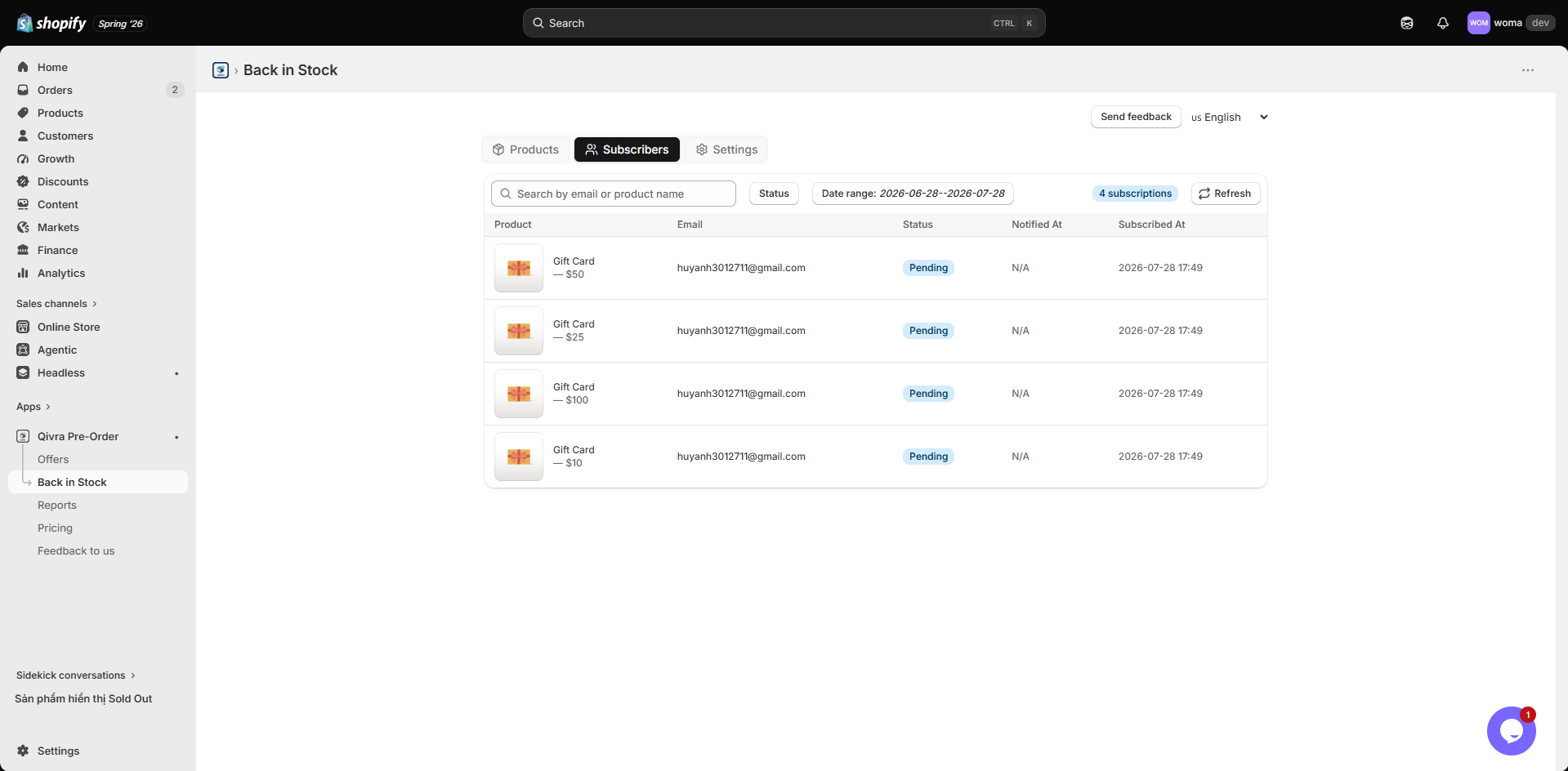
The Subscribers tab in the Back-in-Stock page is a complete history of every shopper who requested a restock alert. Use it to measure demand, troubleshoot delivery issues, and understand which products shoppers are waiting for.
Subscriber Statuses
Section titled “Subscriber Statuses”Each subscription has a status that reflects where it is in the notification flow:
| Status | Meaning |
|---|---|
| Pending | The shopper subscribed, but the product has not been restocked yet. No email has been sent. |
| Sent | The product was restocked and Qivra successfully sent the notification email. |
| Failed | The product was restocked, but the email could not be delivered (bounced, invalid address, or provider error). |
| Cancelled | The shopper removed the subscription themselves — via the Remove link in their confirmation email or by unsubscribing from all emails. |
View and Filter Subscribers
Section titled “View and Filter Subscribers”- Open the Qivra PreOrder admin and go to Back-in-Stock.
- Click the Subscribers tab.
- Use any combination of filters to narrow the list:
- Search - Enter an email address or product name to find specific subscribers.
- Status - Pick one or more of Pending, Sent, Failed, Cancelled.
- Date range - Restrict results to subscribers who signed up within a specific period. The list defaults to the last 30 days.
- The total count appears as a badge next to the refresh button, for example
Total: 1,240. - Click clear to remove every filter at once.
Understand the Columns
Section titled “Understand the Columns”- Product - The product (and variant) the shopper wants to be notified about.
- Email - The address the shopper entered in the Notify Me popup.
- Status - Pending, Sent, Failed, or Cancelled.
- Notified at - When Qivra sent the restock email. Empty for Pending subscribers.
- Subscribed at - When the shopper signed up.
Common Tasks
Section titled “Common Tasks”Find out how many people are waiting on a product
Section titled “Find out how many people are waiting on a product”Use the Search field with the product name (subscribers are listed per product) and set the Status filter to Pending. The total badge shows the count.
Confirm an email was sent
Section titled “Confirm an email was sent”Filter by Status: Sent and look at the Notified at column for the date and time the email left Qivra.
Investigate a failed notification
Section titled “Investigate a failed notification”Filter by Status: Failed. The email address may be invalid, or your email provider may be rejecting the message. Check your provider settings and see Set Up Custom Email (SMTP) if you have not yet configured a sender.
- Subscribers are created automatically when shoppers use the Notify Me popup on your storefront — or imported in bulk.
- The list updates in real time as new subscriptions arrive on the storefront.
- Email delivery is handled by Qivra’s scheduler. After a restock event, it can take a few minutes for emails to go out and for status to change from Pending to Sent.
Importing subscribers in bulk
Section titled “Importing subscribers in bulk”Moving from another back-in-stock app? Import your existing subscribers so they keep receiving restock alerts:
- In the Subscribers tab, click Import subscribers.
- Add rows manually — pick one or more variants and paste one or more emails per row (every variant × email pair becomes a subscription) — or switch to the CSV tab, download the template, fill it in, and upload it.
- Click Import. Imported subscribers are created as Pending — no emails are sent at import time; they’ll be notified at the next restock.
The CSV template has four columns: email (required on every row), sku (exact SKU match, preferred), and product_title + variant_title (used when SKU is blank). Each import handles up to 1,000 rows, and the result report shows how many were imported, already subscribed, not matched, or invalid — with the reason for each failed row.