Plans and Billing
This guide explains the Qivra B2B Wholesale subscription plans, what each plan includes, how billing works, and how to upgrade.
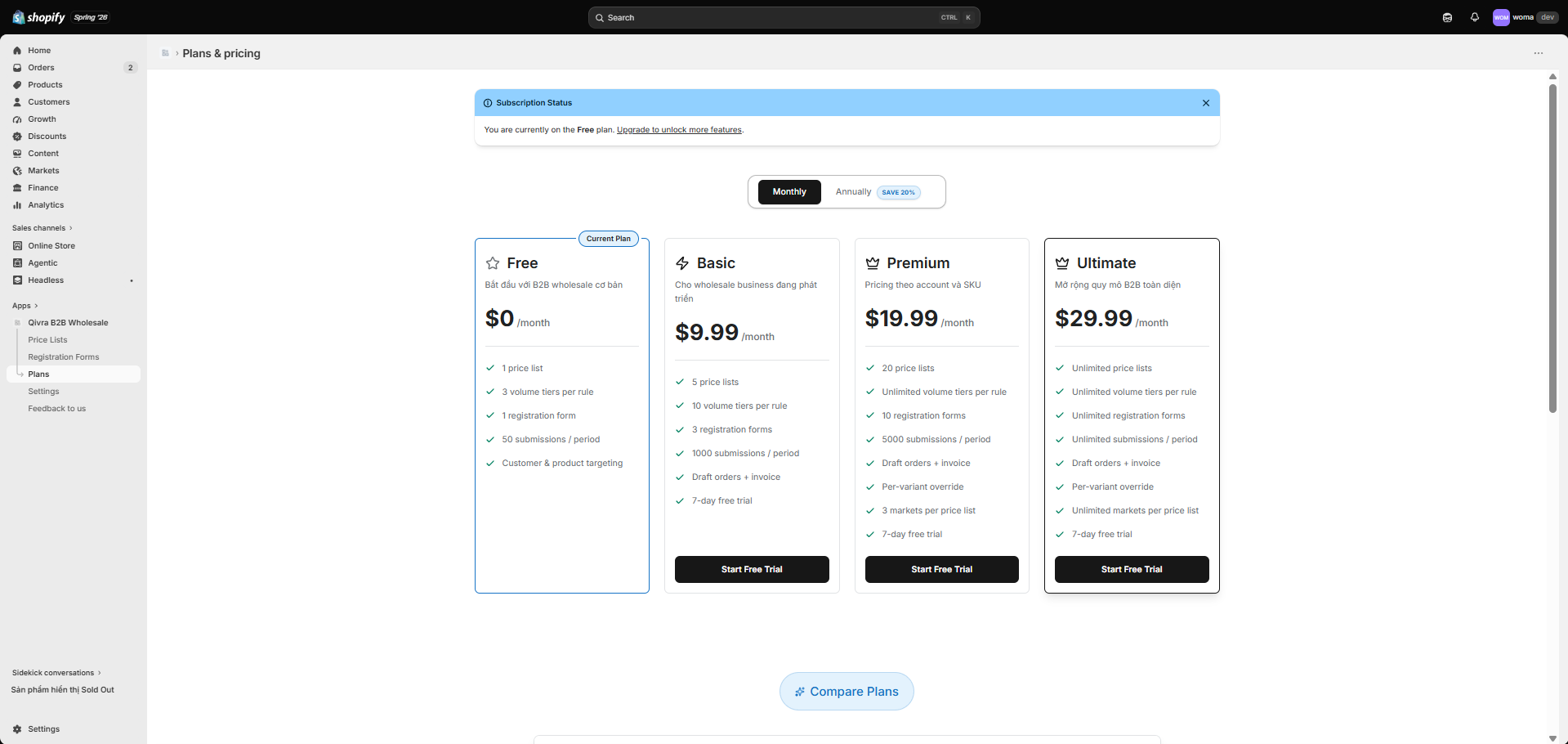
View and manage your plan
Section titled “View and manage your plan”- Open the Plans page — from the Upgrade badge next to a locked field in the registration form editor, or the subscription banner shown when your plan needs attention.
- You see your current plan, a billing interval toggle (Monthly / Yearly), the pricing cards, and a feature comparison table.
- Choose a plan and confirm — you are redirected through Shopify’s secure approval flow and returned to the app.
Plans at a glance
Section titled “Plans at a glance”| Plan | Monthly | Annual (billed yearly) | Best for |
|---|---|---|---|
| Free | $0 | $0 | Getting started with wholesale |
| Basic | $9.99/mo | $95.90/yr ($7.99/mo) | Growing wholesale businesses |
| Premium | $19.99/mo | $191.90/yr ($15.99/mo) | Pricing per account and SKU |
| Ultimate | $29.99/mo | $287.90/yr ($23.99/mo) | B2B wholesale at scale |
Annual billing saves 20% versus monthly.
What’s included
Section titled “What’s included”| Feature | Free | Basic | Premium | Ultimate |
|---|---|---|---|---|
| Price lists | Unlimited | Unlimited | Unlimited | Unlimited |
| Volume tiers per rule | Unlimited | Unlimited | Unlimited | Unlimited |
| Registration forms | Unlimited | Unlimited | Unlimited | Unlimited |
| Submissions per billing period | 2,000 | 2,000 | 2,000 | Unlimited |
| Quotes & quote PDFs | ✓ | ✓ | ✓ | ✓ |
| Draft orders & invoices | ✓ | ✓ | ✓ | ✓ |
| Per-variant price overrides | ✓ | ✓ | ✓ | ✓ |
| Markets per price list | Unlimited | Unlimited | Unlimited | Unlimited |
When you reach the submission limit for your plan, new signups are gated until the next billing period — upgrade to Ultimate for unlimited submissions.
Support levels
Section titled “Support levels”| Plan | Support |
|---|---|
| Free | Community |
| Basic | Standard |
| Premium | Priority |
| Ultimate | Highest |
7-day free trial
Section titled “7-day free trial”Paid plans (Basic, Premium, Ultimate) include a 7-day free trial. You can try the full feature set before being billed. The trial starts when you start the subscription through Shopify.
Upgrade or change plans
Section titled “Upgrade or change plans”- Open the Plans page (from the Upgrade badge in the form editor or the subscription banner).
- Pick the plan you want — you can also switch between monthly and yearly billing.
- Confirm through the Shopify approval flow.
- After approval you are returned to the app and your subscription banner updates.
Prorations and billing are handled by Shopify according to your store’s billing cycle. You can cancel or downgrade at any time from the Plans page.